Introduction: A Powerful Fusion of Style and Play
Fin Evolution Launcher Plus is a next-level customization tool crafted to transform the everyday look and feel of your device. Unlike standard launchers, Fin Evolution Launcher Plus combines visual personalization, performance enhancements, and entertainment features inspired by the fast-paced Fin Evolution game. From themed icon packs and animated wallpapers to gesture shortcuts and instant gaming access, this launcher gives your device a polished and action-packed interface.
With straightforward installation instructions and a user-friendly setup guide, Fin Evolution Launcher Plus is engineered for anyone who wants a visually stunning, functional, and game-integrated mobile experience.
A Fully Customizable Home Screen Experience
The core strength of Fin Evolution Launcher Plus lies in its robust suite of personalization features. Users can completely redesign their home screen with themed Fin Evolution icon packs, animated wallpapers, and advanced gesture controls.
Themed Icon Packs Inspired by Fin Evolution
These professionally designed icon packs transform your normal app icons into bold, sleek visuals. Every icon follows the action-inspired aesthetic of the original game, giving your interface a unified and energetic style.
Animated Wallpapers for a Dynamic Look
The launcher offers numerous animated wallpapers that bring your screen to life. These moving backgrounds add depth and motion, allowing your device to feel as immersive as a gaming environment. With designs based on Fin Evolution themes, every swipe and tap feels visually rewarding.
Gesture Controls for Faster Navigation
Fin Evolution Launcher Plus enables users to assign gesture commands like:
- Swipe up to open Fin Evolution
- Double-tap to change wallpapers
- Swipe down to open quick settings
- Long-press to access customization tools
These gesture shortcuts make navigation smoother and speedier while enhancing personalization.
Quick Menu for Instant Access
With a simple long press on the home screen, the Quick Menu appears. From there, you can instantly access tools such as:
- Animated Wallpapers
- Icon Customizer
- Screen Layout Controls
Fin Evolution Launcher Plus ensures you get complete control without digging into complicated settings.
Integrated Gaming for Seamless Entertainment
One of the defining features of Fin Evolution Launcher Plus is its deep integration with Fin Evolution gameplay. Instead of opening separate apps or menus, gaming is woven directly into your home screen experience.
Direct Game Access
Launch the Fin Evolution game instantly through:
- Tap or swipe gestures
- Dedicated home screen icon
- Quick Menu shortcuts
This merging of launcher and game mechanics makes Fin Evolution Launcher Plus ideal for users who enjoy quick gameplay moments throughout the day.
PlayDeck: Your Gaming Control Hub
PlayDeck centralizes all gaming options in one convenient panel:
- InstaGames: Mini widget-based games such as Slide Puzzle
- Fin Evolution Music: Rhythm-style mini-games
- Web-Based Games Portal: Access to casual browser games
Whether you prefer short challenges or extended play sessions, Fin Evolution Launcher Plus makes sure you always have entertainment within reach.
Useful Tools for Productivity and Information
Beyond visuals and gaming, Fin Evolution Launcher Plus offers several utility features that make your device smarter and more informative.
App Tracer
This tool monitors your app usage, helping you track:
- How long you use each app
- Which apps drain the most resources
- Daily and weekly usage patterns
App Tracer helps users build healthier and more efficient device habits.
App Companion
App Companion offers helpful insights, tips, shortcuts, and information related to apps installed on your device. It enhances usability by teaching users how to get the most out of their apps.
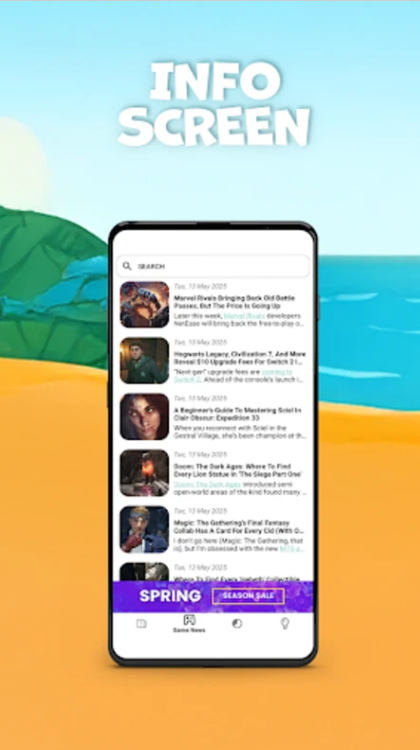
Info Screen for News and Updates
By swiping right on the home screen, users open the Info Screen—an optimized panel offering:
- Latest news
- Gaming content
- App recommendations
- Updates on Fin Evolution content
Fin Evolution Launcher Plus makes sure you stay informed without switching apps.
Support Center for Assistance
If you need help setting up or customizing features, the built-in Support Center provides:
- Troubleshooting guides
- Setup instructions
- Frequently asked questions
This ensures a smooth experience for all users, even those new to launchers.
A Balance of Style, Utility, and Entertainment
Fin Evolution Launcher Plus stands out because it doesn’t limit itself to being a simple customization tool. Instead, it blends three powerful elements:
- Style: Through themes, gestures, and animations
- Utility: With tools like App Tracer and Info Screen
- Entertainment: Through integrated Fin Evolution gaming features
This combination makes Fin Evolution Launcher Plus one of the most versatile launchers available for Android.
Technical Specifications of Fin Evolution Launcher Plus (Version 5.3.5)
| Category | Details | | -------------------- | --------------------------- | | Package Name | com.triangular.finevolution | | License | Free | | Operating System | Android 8.0 or higher | | Category | General | | Language | English | | Author | Tri Angular Games | | Downloads | 0 | | Content Rating | +16 | | Release Date | Nov 13, 2025 |
Fin Evolution Launcher Plus runs smoothly on modern Android systems and ensures compatibility with both older and newer devices thanks to efficient performance optimization.
Why Fin Evolution Launcher Plus Is Worth Downloading
If you want a launcher that blends style, performance, and entertainment, Fin Evolution Launcher Plus offers an unmatched experience.
Key benefits include:
- Fully customizable interface
- Animated wallpapers and themed icons
- Gesture-based navigation
- Integrated Fin Evolution gaming
- Productivity tools like App Tracer
- Informational panels such as Info Screen
- Friendly Support Center
- Free to use with optional upgrades
Fin Evolution Launcher Plus lets you personalize your device without sacrificing speed or functionality.
How to Make the Most of Fin Evolution Launcher Plus
Here are some tips for enhancing your experience:
- Use gesture controls to speed up everyday tasks
- Explore PlayDeck for instant entertainment
- Customize icon shapes and sizes
- Activate animated wallpapers for a more dynamic screen
- Check App Tracer weekly to improve device habits
- Use Quick Menu for rapid customization
The more you explore the settings, the more personalized your device becomes.
FAQs About Fin Evolution Launcher Plus
1. Is Fin Evolution Launcher Plus free to use? Yes. The launcher is fully free with optional ad-removal upgrades.
2. Does the launcher work on older devices? It requires Android 8.0 or higher, making it compatible with most modern devices.
3. Can I play the Fin Evolution game directly from the launcher? Yes. Gesture shortcuts and home screen icons make launching the game instantaneous.
4. Are the animated wallpapers battery-draining? The launcher uses optimized animation rendering to reduce battery impact as much as possible.
5. How do gesture controls work? Users can assign actions like swipe, tap, or long press to trigger apps, shortcuts, or settings.
6. Can I remove ads? Yes, an optional Turbo upgrade removes advertisements.
Conclusion: Elevate Your Device With Fin Evolution Launcher Plus
Fin Evolution Launcher Plus is ideal for users who want both beauty and power in their mobile interface. Its combination of customizable themes, gesture navigation, utility tools, and integrated gaming creates a unique and immersive launcher experience.
By blending style, information, and entertainment, Fin Evolution Launcher Plus transforms your Android device into a polished, lively, and high-performance environment tailored to your preferences.







