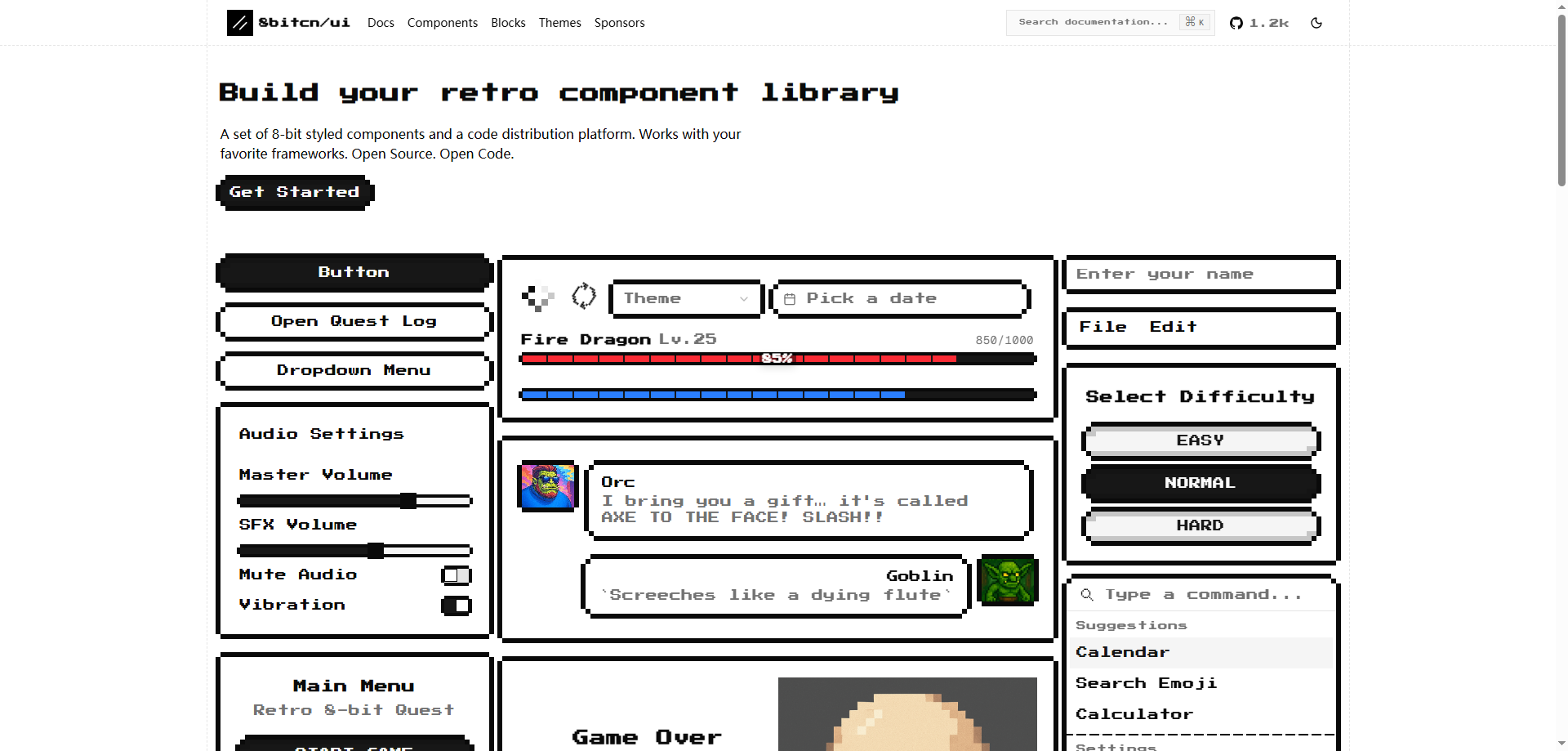
In the ever-evolving world of web development, the desire to create something unique and visually appealing is constant. Enter 8bitcn, a powerful front-end component library that seamlessly blends retro aesthetics with modern technology. With its focus on 8-bit, pixelated designs, 8bitcn allows developers to create engaging, nostalgic interfaces that capture the charm of classic computer games while maintaining the ease and functionality of modern web development.
In this article, we’ll explore what 8bitcn is, how it works, its core features, and how developers can use it to build visually stunning and functional websites and applications.
What Is 8bitcn?
8bitcn is an open-source UI component library that brings the retro 8-bit pixel style to web development. Aimed at developers looking for a nostalgic, fun aesthetic, 8bitcn offers a collection of user interface components designed to mimic the look and feel of classic 80s and 90s video games.
The library includes a variety of UI elements such as buttons, input fields, menus, and alerts, all designed in a pixelated, 8-bit style. These components are easy to implement and integrate with popular front-end frameworks such as React, Vue, and Angular. Whether you’re building a personal project, a game-themed website, or a blog, 8bitcn makes it easy to add a fun, nostalgic design to your web pages.
Why Use 8bitcn in Your Projects?
Incorporating retro design elements into modern websites and applications can set your project apart from the crowd. Here are a few reasons why 8bitcn is worth considering:
- Nostalgic Appeal: The pixelated 8-bit design instantly evokes memories of classic video games, offering a unique and engaging user experience.
- Ease of Use: 8bitcn is designed to be beginner-friendly, with simple integration into existing front-end frameworks. You don’t need to be an expert to create a pixel-perfect interface.
- Open-Source: Being open-source means that 8bitcn is free to use, and developers can contribute, customize, and share components to improve the library.
- Framework Compatibility: Whether you're using React, Vue, or Angular, 8bitcn components are easily integrated into any framework, allowing developers to work within their preferred environment.
- Customization: The components are flexible and can be easily customized to fit the look and feel of your project while retaining their retro charm.
Core Features of 8bitcn
1. Retro 8-Bit UI Components
The library offers a comprehensive set of 8-bit style UI components, including:
- Buttons: Pixelated buttons that bring a playful, retro feel to any action.
- Input Fields: Classic, simple text inputs with a nostalgic design.
- Alerts and Notifications: Old-school notification boxes that add character to your user interactions.
- Menus and Navigation: Pixelated dropdowns, sliders, and more to create game-inspired navigation.
Each component has been designed with simplicity and nostalgia in mind, allowing developers to create interfaces that are both fun and functional.
2. Easy Integration with Any Front-End Framework
One of the main advantages of 8bitcn is its versatility. Developers can use the library with any major front-end framework, including React, Vue, and Angular. The components are modular and easy to integrate, meaning developers can quickly add pixel-style UI elements without having to rewrite code.
The simple integration ensures that 8bitcn can be used in a variety of projects, whether you are working on a small personal project or a large-scale web application.
3. Code Distribution Platform
Another feature that sets 8bitcn apart is its built-in code distribution platform. This platform allows developers to easily share and access components, facilitating collaboration across teams. Whether you need a specific UI component or want to contribute a new one to the library, the distribution platform makes it easy to find, share, and implement components.
4. Open Source and Community Driven
8bitcn is completely open-source, meaning developers can freely use, modify, and redistribute the code. The open-source nature of the project allows developers to contribute their own custom components, bug fixes, and features to the library. This creates a community-driven project where innovation and collaboration are encouraged, helping the library evolve and expand over time.
How to Use 8bitcn in Your Projects
Using 8bitcn in your projects is simple and straightforward. Here's how to get started:
- Choose Your Framework: Whether you’re using React, Vue, or Angular, you can easily integrate 8bitcn components into your project.
- Install the Library: With a few simple commands, you can add 8bitcn to your project and start using the components immediately.
- Customize the Components: Tailor the components to suit your design needs. Whether you’re adjusting colors, sizes, or adding custom animations, the components are flexible and customizable.
- Build Your Interface: Use the 8-bit style buttons, input fields, alerts, and menus to create a unique, nostalgic user interface for your site or application.
- Deploy and Share: Once your project is ready, deploy it and share it with others. You can also contribute your improvements back to the open-source community.
Real-World Use Cases for 8bitcn
Here are a few examples of how developers have successfully used 8bitcn in their projects:
1. Independent Game Developer
An indie game developer used 8bitcn to design a website for their latest game. The site features pixelated buttons, animated backgrounds, and a retro-style navigation menu. The nostalgic design successfully attracted gamers who were fans of retro gaming, helping to boost engagement and game sales.
2. Personal Blog with a Retro Twist
A blogger wanted to make their technical blog stand out from the rest. By using 8bitcn components like retro input fields and pixel-style cards, they gave their blog a unique, playful look. The design not only attracted more readers but also made the content more engaging.
3. Startup Promoting a Nostalgic Game
A startup used 8bitcn to design the landing page for a retro-style video game. The page featured pixelated buttons, game-inspired icons, and nostalgic visuals, which helped to create a strong emotional connection with the target audience. The result was higher user interaction and increased conversions.
4. Personal Project with Retro Navigation
A developer wanted to create a website with a retro game-inspired menu. Using 8bitcn, they implemented a pixelated navigation bar, complete with game-style icons and animations. The result was a nostalgic, user-friendly interface that users found engaging and fun.
Why Developers Love 8bitcn
1. Accessibility and Ease of Use
8bitcn is designed to be easy to use, even for developers with little experience in UI design. Its simplicity allows developers to focus on creating content and features rather than spending hours on design.
2. Endless Customization
Whether you want a simple retro design or something more complex, 8bitcn offers endless customization options. You can modify the components to match the branding of your project while still maintaining the nostalgic 8-bit aesthetic.
3. Open-Source Collaboration
Being open-source, 8bitcn encourages collaboration and contributions from the community. Developers can share their ideas and improvements, helping the project evolve and ensuring it stays relevant and up-to-date.
Conclusion
8bitcn brings a fun, nostalgic touch to modern web development. With its collection of retro 8-bit UI components, developers can create unique, engaging websites and applications that stand out. The ease of integration, flexibility, and open-source nature of the library make it a powerful tool for any developer looking to add a bit of retro charm to their projects. Whether you’re building a personal blog, a game-themed website, or a custom UI for your app, 8bitcn offers the perfect solution for adding that pixelated touch of nostalgia.
By using 8bitcn, you can ensure that your project not only meets modern standards of design and functionality but also taps into the timeless appeal of retro video games.