When it comes to designing interactive and engaging web experiences, animations play a crucial role in making websites or apps feel alive and intuitive. However, designing these animations can often be time-consuming and requires a deep understanding of complex code. Enter EaseMaster, an intuitive tool that simplifies the process of creating animations, allowing designers and developers to generate stunning animations effortlessly.
EaseMaster is a powerful visual editor that allows you to create smooth, dynamic animations using Cubic Bezier curves and Spring physics effects, all while providing code export for various front-end frameworks. Whether you're a UI/UX designer, a product manager, or a front-end developer, EaseMaster offers an easy way to bring your creative animation ideas to life, saving you time and enhancing the overall user experience.
In this article, we will dive into what EaseMaster is, how it works, its core features, and real-world use cases to demonstrate how it can improve your animation workflow.
What is EaseMaster?
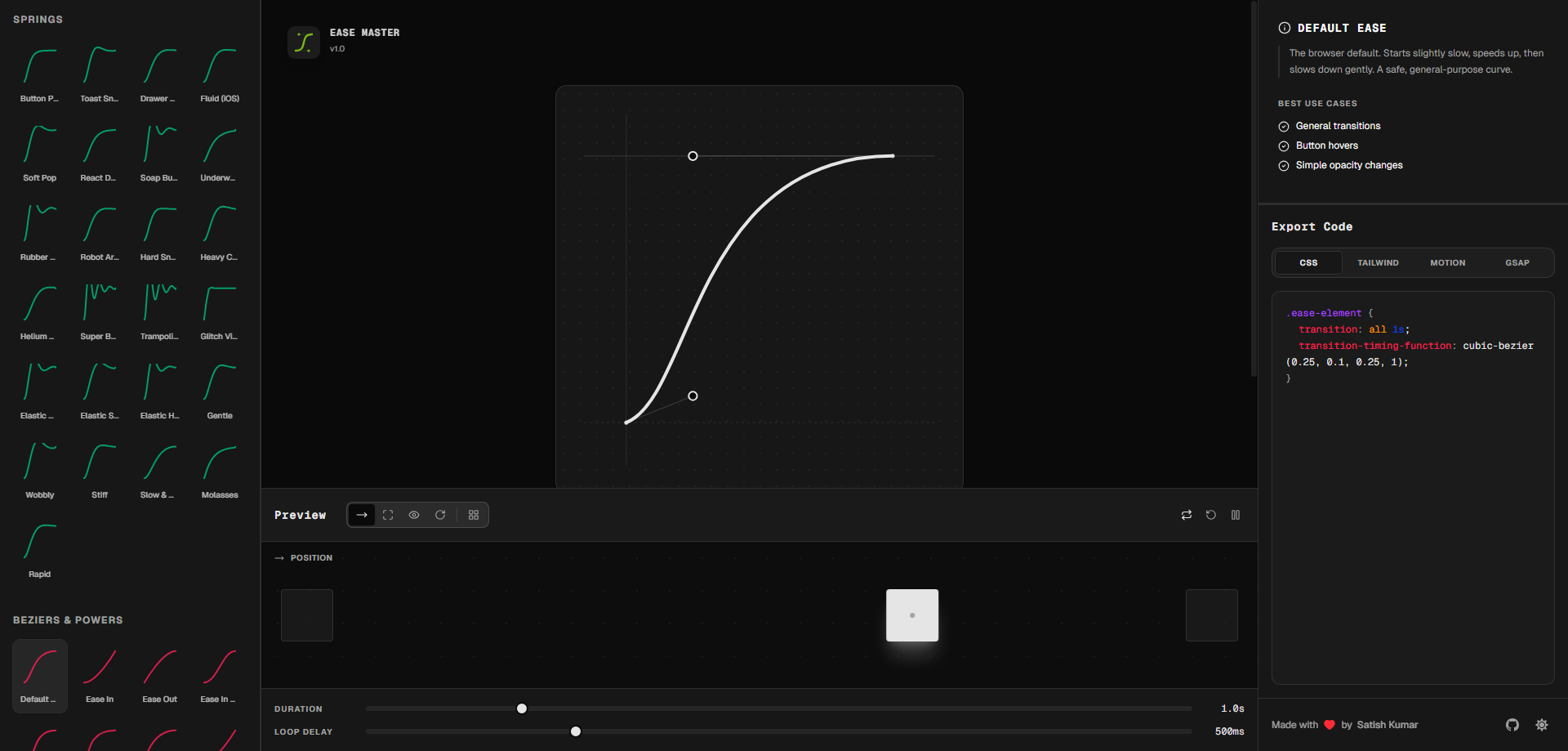
EaseMaster is a dynamic, user-friendly tool designed to simplify the creation of animations for websites and apps. With EaseMaster, you can easily create smooth transitions, animations, and effects using Cubic Bezier curves and Spring physics without writing complex code. The tool allows you to fine-tune animations visually and instantly preview them, ensuring that your design meets your expectations.
Once you’ve perfected your animation, EaseMaster generates the corresponding code in multiple formats, including CSS, Tailwind, Framer Motion, and GSAP. This eliminates the need for manual coding and makes it easy for developers to integrate animations directly into their projects. The tool is ideal for anyone involved in web and app development, particularly UI/UX designers and front-end engineers.
Why Choose EaseMaster?
Creating dynamic animations has traditionally been a challenging and time-consuming task for many designers. Whether you’re working on a website, mobile app, or game, it’s crucial to have intuitive and smooth animations that enhance the user experience. Here’s why EaseMaster is the perfect solution for designers and developers alike:
-
Simplifies Animation Design: EaseMaster offers a visual interface that allows you to create complex animations easily. You don’t need to be a coding expert to design beautiful, interactive animations.
-
Instant Code Generation: After creating an animation, EaseMaster generates the corresponding code for multiple platforms, including CSS, Tailwind, Framer Motion, and GSAP. This feature eliminates the need for developers to manually write animation code.
-
Real-Time Previews: With EaseMaster, you can instantly preview your animations to ensure they match your vision before exporting them. This helps you avoid unnecessary trial and error, improving your workflow.
-
Supports Cubic Bezier Curves and Spring Effects: Whether you want to create smooth transitions or realistic spring-based animations, EaseMaster provides the flexibility to design a variety of animation types that suit your project.
-
Efficient Collaboration: EaseMaster bridges the gap between designers and developers. With the ability to generate code and provide real-time feedback, designers can work more efficiently with developers, speeding up the development process.
Core Features of EaseMaster
1. Visual Editing of Cubic Bezier Curves
EaseMaster allows you to create and edit Cubic Bezier curves visually. This feature enables you to control the acceleration and deceleration of animations precisely, ensuring that your animations are smooth and natural. By adjusting the curve, you can make animations feel more dynamic, with less robotic movement.
Cubic Bezier curves are a powerful tool for animating motion, as they allow for fine control over how an element moves over time. With EaseMaster, you can tweak the curves in real-time, adjusting the speed and smoothness of the transitions, ensuring your animations look professional.
2. Spring Physics Animation Editor
For more natural, physics-based animations, EaseMaster includes a Spring editor that simulates the movement of elements with bounce, elasticity, and friction. Whether you want to create springy, rubber-band-like effects or more subtle natural movements, EaseMaster makes it easy to fine-tune the physical properties of your animations.
The Spring editor is perfect for creating more realistic interactions, such as elements that bounce when clicked or images that zoom in with a spring-like effect. This feature is particularly useful for enhancing user engagement and creating playful, interactive designs.
3. Real-Time Animation Previews
With EaseMaster, you can see how your animation will behave in real time before you finalize the design. This live preview feature helps you make quick adjustments to timing, speed, and curves, ensuring that the animation behaves exactly as expected. It eliminates the guesswork involved in animation design, allowing you to iterate quickly and refine your animations.
4. One-Click Code Export for Multiple Frameworks
One of the standout features of EaseMaster is its ability to generate code for various front-end frameworks, including CSS, Tailwind, Framer Motion, and GSAP. This eliminates the need to manually code animations or search for the right snippets. Once you’ve perfected your animation, simply click a button, and EaseMaster will provide you with the necessary code to embed in your project.
This feature significantly reduces development time and makes it easy for designers and developers to collaborate efficiently. You can focus on creating great animations while EaseMaster handles the technical details.
5. Preset Animation Curves and Effects
For beginners or those looking to speed up their workflow, EaseMaster offers a library of preset animation curves and physics effects. These presets provide a great starting point, allowing users to quickly implement animations without needing to build them from scratch. Whether you're designing a simple hover effect or an intricate page transition, you can easily find a preset that fits your needs and customize it to your liking.
How to Use EaseMaster
Using EaseMaster is simple and intuitive:
-
Create Your Animation: Open EaseMaster and select the animation type you want to create. You can either start from scratch or choose from a preset animation curve or effect.
-
Adjust the Animation Settings: Use the visual editor to tweak the animation. Modify the speed, timing, and curve of your animation, or adjust the spring properties for more dynamic effects.
-
Preview the Animation: Once you’ve made your adjustments, preview the animation to ensure it behaves as expected. You can make further tweaks until you’re satisfied with the result.
-
Export the Code: After finalizing your animation, click the export button to generate the code for CSS, Tailwind, Framer Motion, or GSAP. You can then copy and paste the code directly into your project.
-
Integrate and Enjoy: Implement the animation in your web or app project and watch as your design comes to life with smooth, engaging effects.
Real-World Use Cases for EaseMaster
1. Designing Navigation Menus
Imagine you’re designing a navigation menu for a website. With EaseMaster, you can create smooth sliding or fade-in animations that make the menu appear naturally when triggered. These animations enhance the user experience, making navigation feel more fluid.
2. E-Commerce Website Animations
For e-commerce websites, EaseMaster can be used to add hover effects to product cards, such as subtle zoom-ins or bounce effects, attracting users’ attention. These interactive animations can help highlight products and improve conversion rates.
3. Parallax Scrolling Effects
On a website with parallax scrolling, EaseMaster can help design fluid and engaging scrolling animations that add depth to your page. With its real-time preview feature, you can tweak the scroll effect until it looks just right, creating a visually compelling experience for users.
4. Gaming Animations
EaseMaster is also useful for game developers who want to add interactive animations to characters or objects. For instance, you can use the Spring physics editor to design powerful jump or attack animations for characters, giving the game a more immersive and dynamic feel.
5. Content Creation Animations
Content creators can use EaseMaster to generate smooth transitions for their presentations, video intros, or website elements. The ease of generating professional-quality animations in seconds is a huge benefit for creators looking to save time while producing engaging content.
Why EaseMaster is a Game-Changer for Animations
EaseMaster makes animation design accessible to everyone—whether you’re a designer, developer, or content creator. It simplifies the process of creating smooth, interactive animations while providing a powerful tool for generating code that integrates seamlessly with modern web frameworks. By combining visual design tools with easy code export options, EaseMaster empowers you to bring your creative ideas to life with ease.
Conclusion
If you're looking to add sophisticated animations to your website, app, or game, EaseMaster is the perfect solution. With its intuitive visual interface, real-time previews, and one-click code export, you can design, refine, and implement animations quickly and efficiently. Whether you're a beginner or an experienced developer, EaseMaster makes animation creation simple, fun, and highly productive.